
Printing with an enclosed 3D printer
The Bambu X1C is an enclosed 3D printer, meaning it has side panels, top glass cover and a glass door that fully encloses the printing area. This kind of setup is very useful, especially when printing with materials that are sensitive to temperature changes. But depending on the filament you’re using, it can either help or cause some problems, so it’s good to understand how it works.
Keeping a Consistent Temperature Inside
One of the main benefits of having an enclosed printer is that it helps keep the temperature inside the chamber stable. Without an enclosure, your prints can be affected by small air movements – like a breeze from a window or a fan – which can cool the plastic too quickly and cause defects or print failures.
This stable environment is especially helpful when printing materials that need higher temperatures, like ABS or ASA. These filaments are more sensitive to cooling, and if they cool too quickly, the different layers in your print can separate or crack. This issue is called delamination, and it happens because the plastic shrinks as it cools. If that cooling is too fast, the internal stress in the material doesn’t get a chance to slowly release, and the layers pull apart.
What Heats the Chamber?
Now, the X1C doesn’t have an active chamber heater (like you’d find in more advanced printers such as the Bambu Lab X1E or the Bambu Lab H2D), but that doesn’t mean the chamber stays cold. When the printer is working, the heatbed also gives off heat. This radiant heat slowly warms the entire chamber during the print. Over time, this can raise the internal temperature significantly, especially if the door and top of the enclosure are closed.
For high-temperature materials like ABS or ASA, this is actually a good thing. It helps reduce the chance of cracking and warping. In fact, preheating the chamber before printing can lead to even better results – this involves heating the bed ahead of time and letting the enclosure warm up before the print begins. We’ll explain how to do that effectively in a later chapter.
What is Glass Transition Temperature?
To understand why some materials don’t work well in a warm chamber, let’s talk about something called glass transition temperature. This is the temperature at which a material, like the filament, starts to soften and becomes more flexible or rubbery.
Different filaments have different glass transition temperatures:
- PLA: around 50-60°C
- PETG: around 70–80°C
- TPU: around 60°C
- ABS: around 105°C
- ASA: similar to ABS
While the print nozzle can reach up to 300°C, the filament outside the nozzle still needs to stay firm until it gets pushed into the hot section of the nozzle. If the temperature inside the chamber climbs above around 35°C, filaments like PLA and PETG can start getting too soft too early. This causes a few problems:
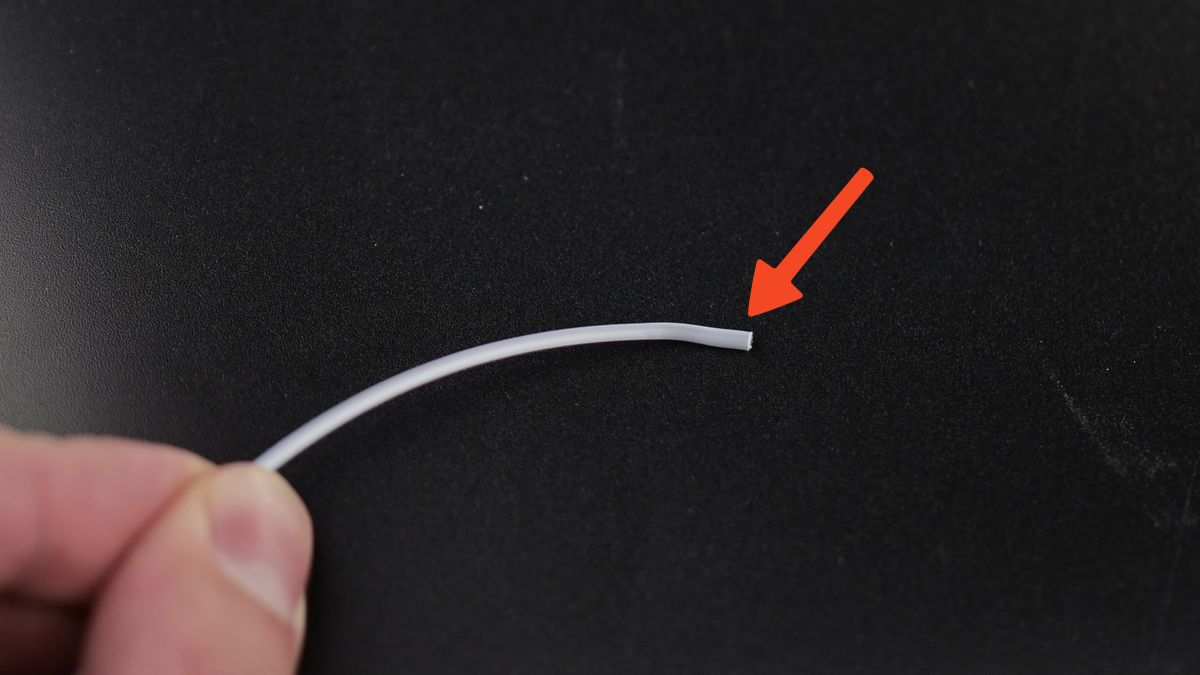
The filament can swell or expand slightly in the cold side of the nozzle, stopping the filament from moving forward. You can see how the right side of the filament is slightly swollen, compared to the left side.
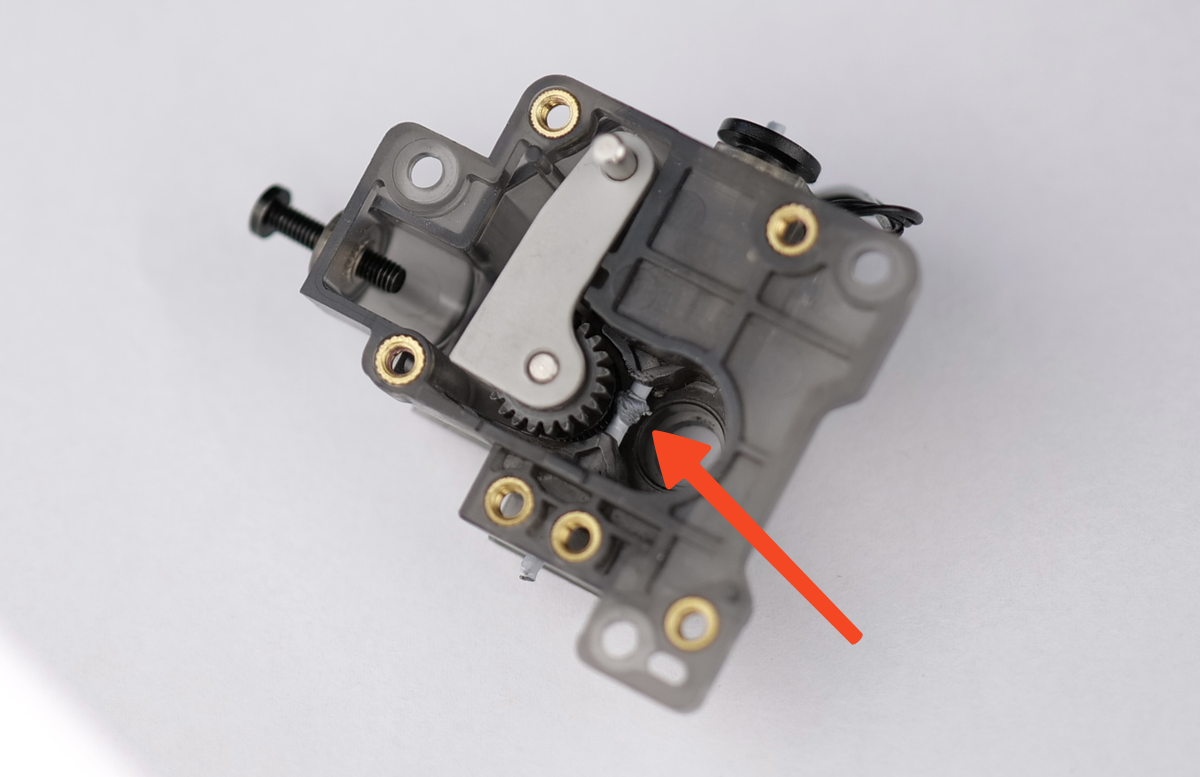
The extruder gears, which push the filament forward, may start to squish or deform the filament. In the example below, the filamet got soft inside the extruder and was crushed by the extruder gears.
These things can lead to a clog, because the filament gets stuck or can’t move smoothly into the nozzle.
To avoid this, when printing with PLA, PETG, or TPU, it’s best to leave the door slightly open or remove the top glass cover so the excess heat can escape. That keeps the chamber cool enough to avoid problems.
Another solution is to increase the Chamber Exhaust Fan speed using Bambu Studio. Once a print starts, you can set the fan speed to 100% which will help exhaust the warm air outside the chamber while also passing the airflow through the carbon filter, but it comes with the downside of increased noise.
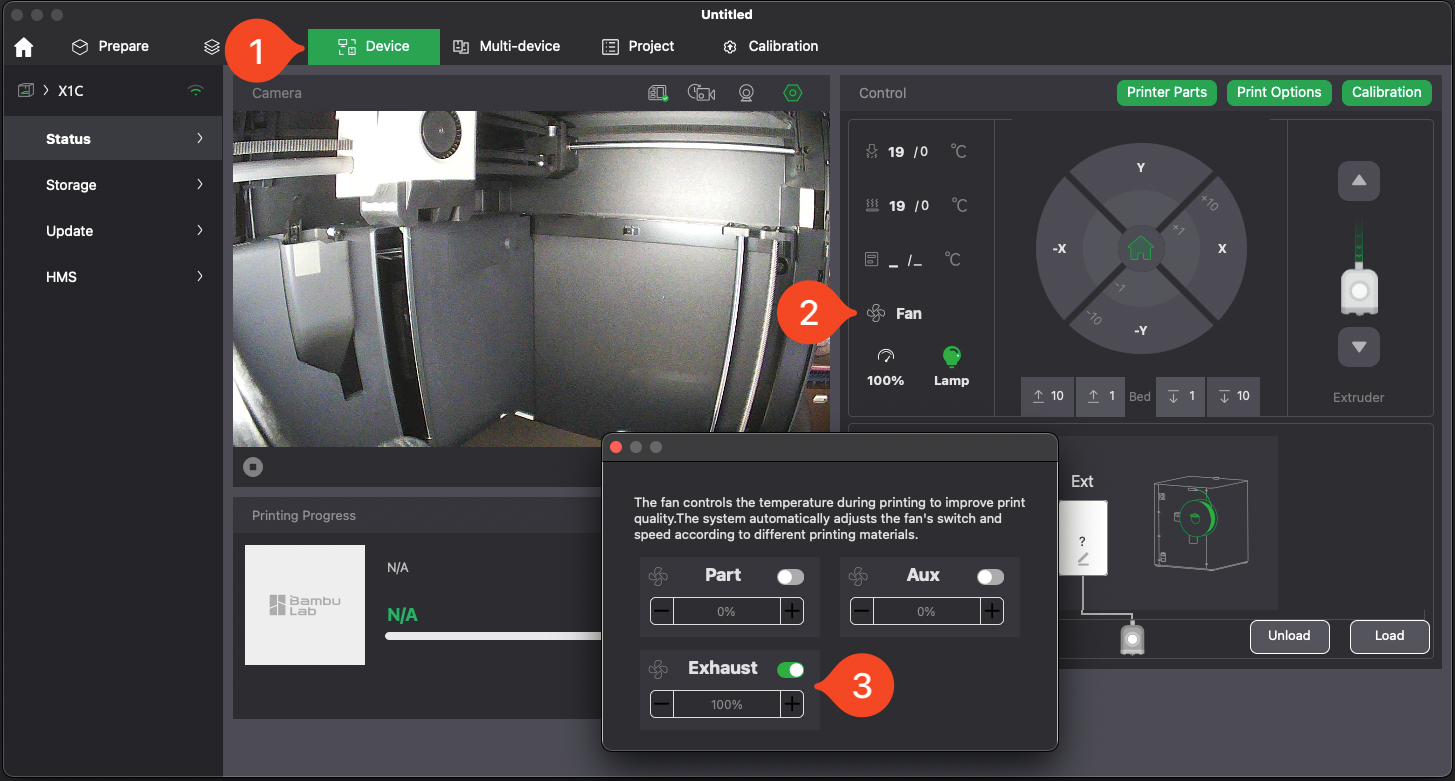
Please be aware that in warm environments, this solution might not be enough.
Fume Control
Another benefit of an enclosed printer is it helps to contain fumes. Some filaments, especially ABS, ASA, and Nylon, release smelly or even harmful fumes during printing – these are called VOCs (Volatile Organic Compounds). While the enclosure doesn’t completely trap them, it does help limit their spread into your room. Still, good ventilation is important! You don’t want to rely on the enclosure alone if you’re printing with these types of materials.
On the other hand, more beginner-friendly filaments like PLA, PETG, and TPU produce fewer fumes. They’re safer to use in most spaces, but it’s still a smart move to have airflow in the room, just to stay on the safe side.